What is a Pretrained Model?
3 mins read - Updated on Oct 28, 2026A pretrained model is an AI model that Kimola has already trained and keeps up to date, so you can classify customer feedback with it right away, without writing labels or preparing a training set. Kimola offers 15 pretrained models: general-purpose models that find themes, sentiment and named entities in any kind of feedback, industry classifiers with the labels of their sector, such as e-commerce, banking or mobile apps, and models for news topics and hate speech. Pretrained models are available in every package, including the free Starter package.
Pretrained models are one of the two kinds of models in Kimola. The other kind, custom models, classifies feedback with labels you define. The difference between them is who defines the labels: in a pretrained model, Kimola does.
How Pretrained Models Work
A pretrained model reads every piece of feedback and tags it with the labels Kimola has set for it. Each label has a name and a description of what it covers, and the labels stay the same from one dataset to the next, so two Reports that use the same pretrained model can be compared label by label. The Automatic Classifier is the exception: it has no fixed list of labels and finds the themes in each dataset itself.
Feedback that fits none of a model's labels gets none of them, so unrelated or ambiguous text doesn't distort the counts. With multi-label classification, a piece of feedback that mentions several topics gets every label that fits, and each label gets its own sentiment. See Multi-label vs. Single-label Classification.
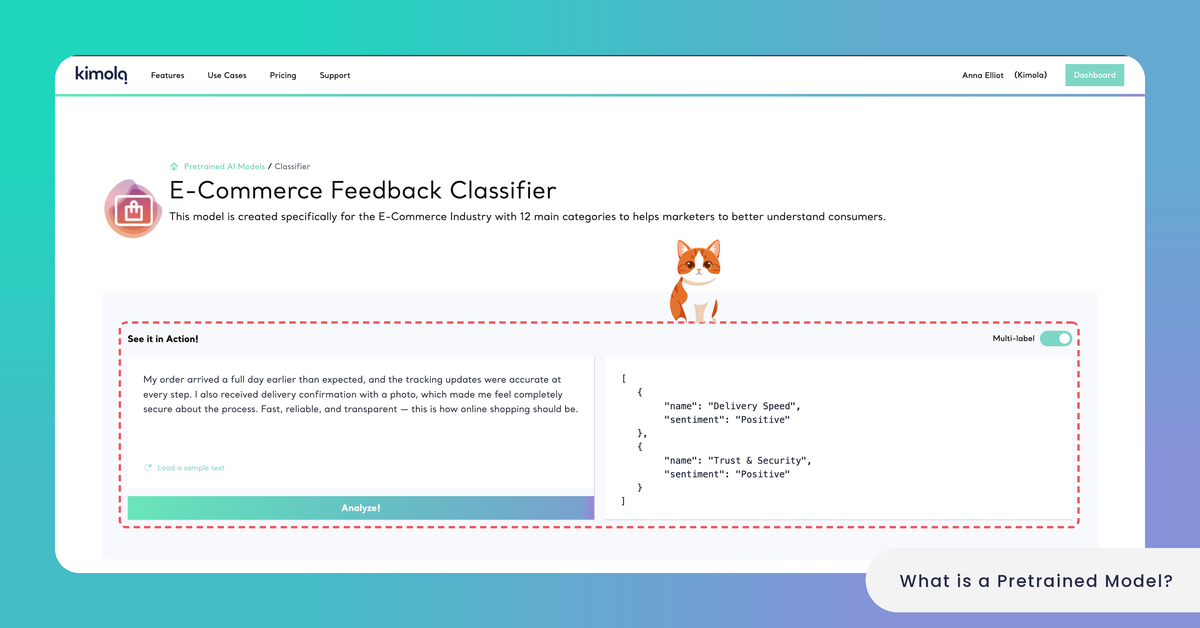
The E-Commerce Feedback Classifier has 12 labels, among them Delivery Speed, Packaging & Condition and Returns & Refunds. An online fashion store's review "The jacket arrived a week late and the box was crushed, but the refund for the missing belt came the same day" gets all three. With multi-label classification, Delivery Speed and Packaging & Condition are negative and Returns & Refunds is positive.
Pretrained models classify feedback in more than 30 languages, so the same labels apply to reviews in English, Spanish, German or Turkish. Kimola maintains the models and updates them as the language of each sector changes. You can read every model's labels and their descriptions, but you can't change them or see the data the model was trained with. When you need labels of your own, create a custom model.
The 15 Pretrained Models
Kimola's pretrained models fall into three groups. The full list, with what each model does and a link to its page, is in List Pretrained Models.
General-purpose models work on any kind of feedback. The Automatic Classifier finds the themes in the data and names them after what customers say. The Sentiment Classifier labels each piece of feedback Positive or Negative. The Entity Extractor picks out the people, organizations, brands, products and places a text names, sorted into more than 35 classes. The Consumer Feedback Classifier sorts comments about a product, a service or a brand in general.
Industry classifiers come with labels for the topics of their sector, most of them with 12 or 13 labels: the E-Commerce, Mobile App, Mobile Game, Software, Online Course, HoReCa (hotels, restaurants and cafés), Banking, Automotive and Mobile Network Feedback Classifiers.
Models for other kinds of text are the News Classifier, which sorts text into news categories, and the Hate Speech Detector, which finds hate speech towards an ethnicity, a nationality, a religion, a sexuality, a disability or a class.
Each pretrained model has a page on kimola.com/pretrained-ai-models with its description, its labels and a console to try it.
Where You Use Pretrained Models
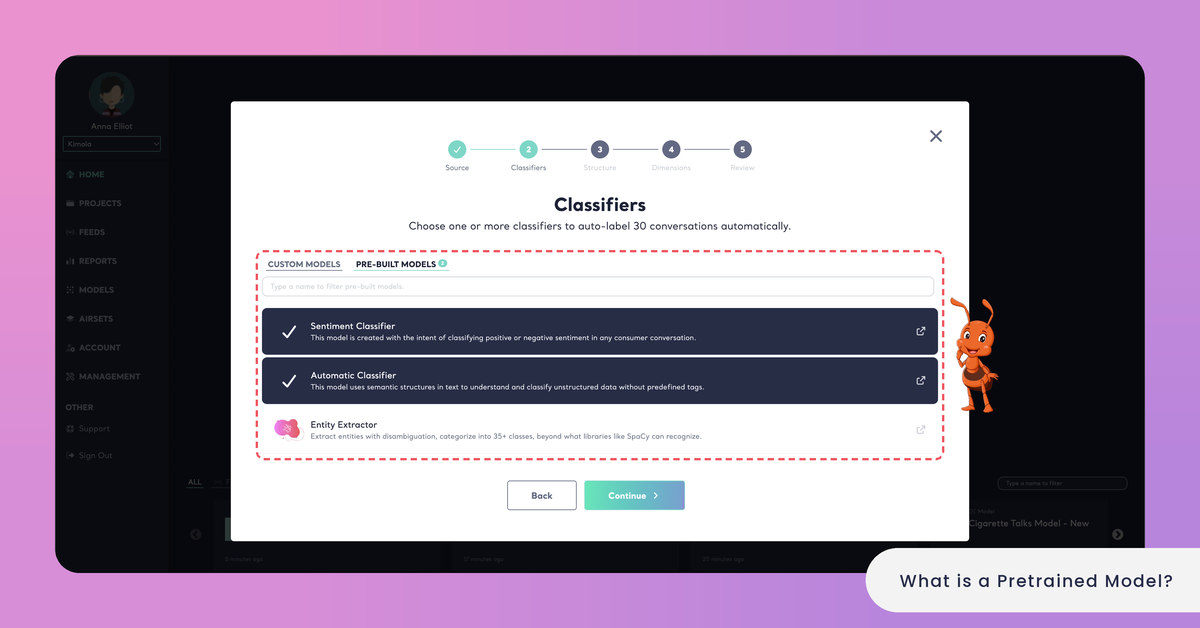
You use pretrained models in Reports. In the Classifiers step of the Report wizard, they are listed under PRE-BUILT MODELS, next to your CUSTOM MODELS. A new Report starts with the Automatic Classifier and the Sentiment Classifier, and you can add other pretrained models, your custom models or both to the same Report. See Create a Report Using Pretrained Models.
Pretrained models have no menu item of their own: the Models page in the main menu lists your custom models. In the Report, a pretrained model's results appear on the same screens as those of any other model, and its labels can be filtered, compared and crossed in Tables like any theme.
Every model you add to a Report uses queries by the same rule, pretrained or custom: queries = rows × models × Dimensions. See How to Calculate Queries.
A Funnel takes custom models only, so the files of a Space are always classified with custom models. Funnels and Spaces are available in the Enterprise package. Pretrained models can also be used through the Kimola API, which is available in the Enterprise package.
Pretrained models classify Reports. A Funnel, and with it every Space, takes custom models only.
Try a Model Before You Use It
You can try a pretrained model on your own text before you add it to a Report. On its page on kimola.com, type or paste a text, or click Load a sample text, choose whether Multi-label is on and click Analyze!. The labels the model gives the text appear under Predictions.
Kimola's test console also takes a whole file: under Document, you upload a dataset in .xls, .xlsx, .csv or .tsv format, smaller than 30 MB, and see how the model classifies many records at once. See Test a Pretrained Model.
When to Choose a Pretrained Model
A pretrained model fits when you want results without any setup. That is the case when you look at a dataset for the first time and want to see what customers talk about (the Automatic Classifier shows you the themes), when you need sentiment or the names customers mention, when one of the industry classifiers matches your feedback, and when you work on the Starter package.
A custom model fits when your teams already have names for the topics they track, when no pretrained model covers your sector or your question, and when your organization classifies Spaces with a Funnel. See Custom vs. Pretrained Models.
An online course platform might read its course reviews with the Online Course Feedback Classifier and the Sentiment Classifier to see how learners feel about the usual topics of its sector. When it wants to track topics of its own, such as certificate delays or mentor sessions, it creates a custom model with those labels.
The two kinds also work one after the other. Read a first dataset with the Automatic Classifier and review the themes it finds, then turn the Report into a custom model with Create a Custom AI Model under MODELLING in the Report's Settings (see Create a Custom Model with a Report). From then on, every new dataset is classified with the same labels, which you can rename, describe and group into categories.