What is the Co-Occurrences Dimension?
min read - Updated on Nov 02, 2026Co-Occurrences is the Dimension that asks every piece of customer feedback "Alongside what does this occur?" It highlights the other products, tools, behaviors or elements mentioned together with the experience: the accessories a product is used with, the apps a tool works next to, the habits and routines it is part of. Kimola groups the same companion across all of your reviews, survey responses and support conversations and counts the records behind each one, so you see what your product is used with and how much of your feedback each companion accounts for. Co-Occurrences belongs to both the Comparisons and the Context groups and is available in every package.
A Dimension is a research question Kimola asks of every piece of feedback. Themes tell you what customers talk about, and sentiment tells you how they feel about it. Co-Occurrences shows what else is part of the experience, which makes it the Dimension for finding the products mentioned together in reviews. Every answer stays tied to the feedback that gives it, so you can open the records behind a companion and read them.
To use Co-Occurrences, you need a Kimola account and customer feedback to analyze. If you don’t have an account yet, sign up first.
For a Report, sign in and open the report you want to work with from the Reports section. If you haven’t created a report yet, follow one of these guides: Create a Report by Uploading a Custom Dataset, Create a Report by Adding Links.
You can select Co-Occurrences while creating the Report or add it later. For instructions, see Use It in Kimola.
For a Space, you need a Funnel with a Co-Occurrences Dimension model. If you haven’t set these up yet, see Create a Funnel, Add Dimensions to a Funnel and Create a Space. Upload feedback to the Space after adding the model so it can be classified with Co-Occurrences.
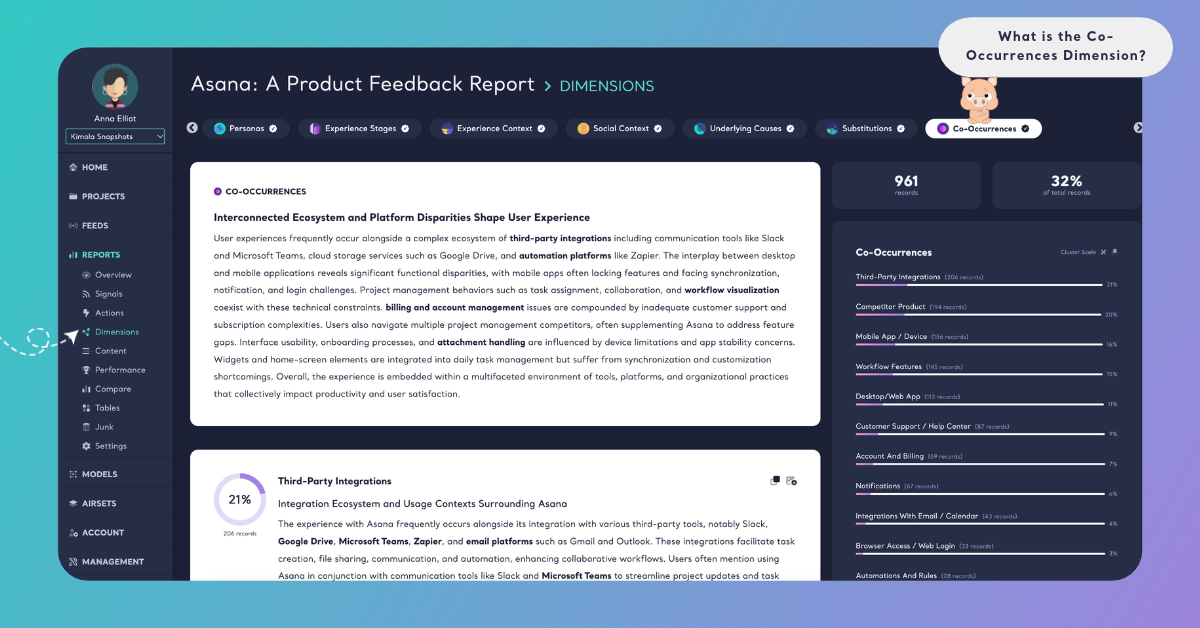
The Question It Asks
Co-Occurrences asks one question of each record: "Alongside what does this occur?" The answer is something that comes together with the experience, taken from what the feedback says. It can be another product or an accessory, such as a case for a phone, a grinder for a coffee machine or a charger for an electric scooter. It can be a tool or a service used next to yours, such as a spreadsheet, a calendar app or a payment service. It can also be a behavior or a routine, such as making breakfast, working out, studying or watching a series. Some feedback names the companion directly ("I pair it with…", "I use it together with…", "It syncs with…"). Other feedback shows it through what it describes: a review that complains about exporting every report to a spreadsheet to share it shows a spreadsheet used alongside the product, even if the review never says "together".
Feedback that mentions nothing beside the experience itself gets no answer for Co-Occurrences. That is expected: a short review such as "Arrived quickly and works well." names nothing else. The share of records that answer Co-Occurrences tells you how often your customers describe your product as part of a larger setup. One piece of feedback can mention several companions at once, and each one is counted.
Co-Occurrences is different from Substitutions, the other Dimension of the Comparisons group. Substitutions asks "Instead of what does this occur?" and shows the alternatives your product replaces or is compared against. Co-Occurrences shows what is used together with it. The same brand can answer either one: "I switched from my old tracker" is a substitution, "I wear it with my old tracker" is a co-occurrence. In the Context group, Co-Occurrences is also different from Social Context, which asks "With whom does this occur?" and is about people only, and from Experience Context, which asks "Where does this occur?" and describes the setting. Co-Occurrences is about things and activities, not people or places.
Co-Occurrences is not a count of words that appear next to each other in a text. It is a question asked of each piece of feedback, and the answer is what the customer describes using or doing together with the experience.
What You Get
Kimola builds the answers of Co-Occurrences from your data. It reads the dataset, finds the products, tools and behaviors customers mention together with the experience and names each answer in their terms, so the companions in feedback about a coffee machine and those in feedback about a project management tool come out different. Across thousands of records, Kimola groups the same companion under one answer and counts the records that give it. The counts and shares come from the classification itself; an AI model writes the summaries afterwards, from numbers that are already computed.
The answers draw the setup your product lives in as customers describe it. Some companions are products you sell or could sell, some are tools of other companies your product has to work with, and some are routines that tell you when and why the product is reached for.
In a Report
On the Report's Dimensions page, Co-Occurrences has its own tab. A ring shows the share of the Report's records that answer the question. The summary card gives a headline and a few paragraphs on what your customers use together with your product, with key terms in bold. Below it, each companion is a cluster with its number of records, its share, a short summary. A companion with very few records gets no summary, and the page says "Summaries are not available due to small cluster sizes."
Cluster Scale shows each companion's share of the records that answer Co-Occurrences, and Dataset Scale shows its share of all the records in the Report. Because one record can mention several companions, the shares on Cluster Scale can add up to more than 100%. The Columns and Dimensions buttons on a cluster card show what lies behind a companion, for example the Pain Points customers report when they use your product with it, or the product lines its feedback comes from. See Dimensions in Reports.
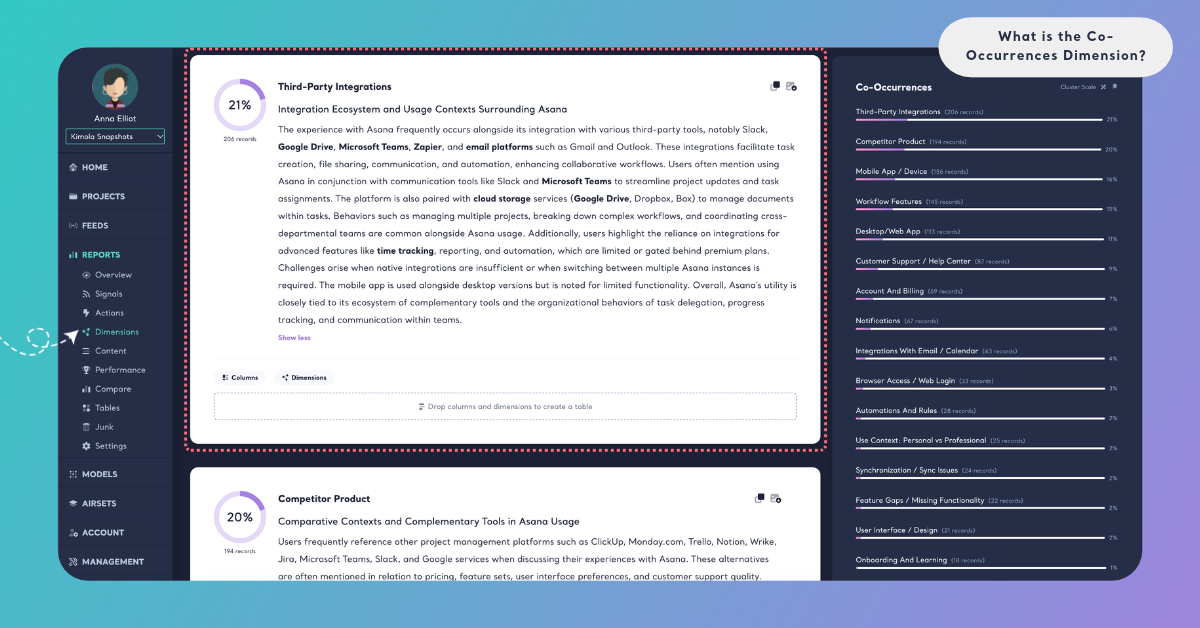
In a Space
Spaces are available in the Enterprise package. On a Space's Dimensions page, Co-Occurrences shows its answers under What they talk about and how they change Over time. A companion whose share changed significantly with the last upload is marked ▲ or ▼ "since the last upload", so a tool or an accessory that customers start to pair with your product shows up with the next file. Kimola writes Insights after every new file: What the answers say for Co-Occurrences as a whole, and Why they answer so for each companion that at least 10 of the latest records give. In a Space, the answers come from the labels of the Funnel's Co-Occurrences model. See Dimensions in Spaces.
In both Reports and Spaces, you can filter the Content and Performance pages by a companion, or cross Co-Occurrences with a column or a classifier in Tables, for example Co-Occurrences by sentiment or by product line.
An Example
Take this invented review of a home espresso machine:
"I used to buy a latte at the café on my way to work, now I make one at home every morning while the kids have breakfast. I bought a separate grinder because the beans from the supermarket were too coarse, and I use oat milk, which the steam wand handles fine. The only hassle is the descaling tablets: the machine asks for them every month."
Co-Occurrences finds four answers in it. "Separate grinder" is an accessory bought to go with the machine, and "Oat milk" is a product used with it every day. "Descaling tablets" is a consumable the machine needs. "Breakfast routine" is a behavior the coffee is part of. The café latte is not a co-occurrence: the machine replaces it, so it is an answer for Substitutions. The monthly hassle with the tablets is an answer for Pain Points, the kids at breakfast are picked up by Social Context, and the morning by Experience Stages, when those Dimensions are added.
A second review, "Makes great coffee and looks good on the counter.", mentions nothing used together with the machine, so it gets no Co-Occurrences answer.
Across a dataset of 4,000 reviews, the same companions gather into clusters. "Plant-based milk" might be the largest, with 610 records, followed by "Separate grinder" and "Descaling products". The summary would then say that many customers make milk drinks with plant-based milk, and crossing Co-Occurrences with Pain Points in Tables would show that complaints about the steam wand gather in the feedback that mentions plant-based milk.
The answer names and numbers here are illustrative: Kimola names the companions of your own data in your customers' words.
When to Use It
Use Co-Occurrences whenever a decision depends on what your product is used with: what to bundle, what to work with, what to recommend next. It reads best in feedback where customers describe how they use a product: product and app store reviews, e-commerce reviews, open-ended survey answers and support conversations.
Bundles and cross-selling. The largest companions tell you which products to offer together, which accessories to recommend on a product page and which consumables to sell as a subscription. A companion customers buy elsewhere is a gap in your range.
Integrations and compatibility. In feedback about software, Co-Occurrences shows the tools your product is used next to. Cross it with Pain Points in Tables to see which pairings cause trouble, such as a sync that fails or an export customers repeat by hand. The most frequent pairings are the integrations to build or improve first.
Partnerships. A brand or a service that comes up often next to yours is a candidate for a joint offer or a co-marketing campaign, because your customers already use both.
Routines and use cases. Behaviors such as cooking, training or commuting show the moments your product is part of. Cross them with Motivations to see why customers reach for it in each routine, and use their words in your messaging.
Competitors. Create a Report from the review pages of a rival's product to see what their customers pair it with, and compare it with your own. A tool that rivals' customers mention and yours don't can point to a missing integration.
Change over time. In a Space, follow the ▲ and ▼ marks after each upload to see a new tool, platform or accessory entering your customers' setup, or an old one leaving it.
Co-Occurrences works best together with the Dimensions of its two groups. In the Comparisons group, Substitutions ("Instead of what does this occur?") shows what your product replaces, next to what it is used with. In the Context group, Experience Stages ("When does this occur?") adds the moment, Experience Context ("Where does this occur?") adds the setting, and Social Context ("With whom does this occur?") adds the people. Outside its groups, Pain Points gives the problems each pairing brings, and Unmet Needs shows what customers want your product to do with the things they use alongside it.
Use It in Kimola
How you add Co-Occurrences depends on whether you work in a Report or a Space.
In a Report
Select Co-Occurrences in the Dimensions step while you create a Report. It is listed under All, under Comparisons and under Context. Click it to add it to My List, then check the Required Query in the Review step. To add it to a Report that is already analyzed, open the Report's Dimensions page, click the Co-Occurrences tab without a check mark and click Generate Now. Kimola classifies the Report's existing records with Co-Occurrences and writes its analysis. The steps are in Add Dimensions to a Report.
Dimensions add to the queries a Report uses: queries = rows × models × Dimensions. For what your package includes, see kimola.com/pricing.
In a Space
A Space gets Co-Occurrences from a Dimension model in its Funnel. In Models, click Create AI Model, choose By Prompt, click Dimension in the Purpose step and choose Co-Occurrences under Which dimension?. Its Question and Description are filled in, and you can fine-tune them for your business. In Labels, define the companions your Spaces can find, such as "Separate grinder", "Plant-based milk" or "Breakfast routine", each with a short description. Then pick the model on the DIMENSIONS tab of the Funnel wizard's Models step. Every file uploaded to the Funnel's Spaces after that is classified with Co-Occurrences. The steps are in Add Dimensions to a Funnel.
Spaces are available in the Enterprise package. They are also available in Kimola On-Premises.